The release loop: how to keep your app moving when you step away
A factory manager cannot stand on the floor 24 hours a day. The factory still runs, because everyone on the floor knows what their job is, what "finished" means, and who gets the work next.
Most founders who build an app with AI tools work the other way round. The agent writes code while you watch. You read what it did, you test it by hand, you tell it what is wrong, and it tries again. The moment you close the laptop, the work stops. You are the loop.
This guide shows the loop we run instead, so the work carries on while you sell, sleep or take a day off. You can set it up yourself. Nothing in it is tied to one tool.
The mindset: stop being the one who checks
An AI agent that writes code is quick. Speed is not what holds your app back. What holds it back is that every change waits for you: to explain it, to try it, to decide whether it is good enough.
So the question to ask is not "how do I make the agent faster?" It is "what would have to be true for me to trust this change without having watched it being made?"
The answer is the same as in any workplace you cannot supervise all day:
- the job is written down before it starts;
- the person doing it is not the person checking it;
- there is one clear test for "done";
- work that fails the test goes back, on its own, without waiting for you.
Put those four things in a circle and you have the loop.
What the loop looks like
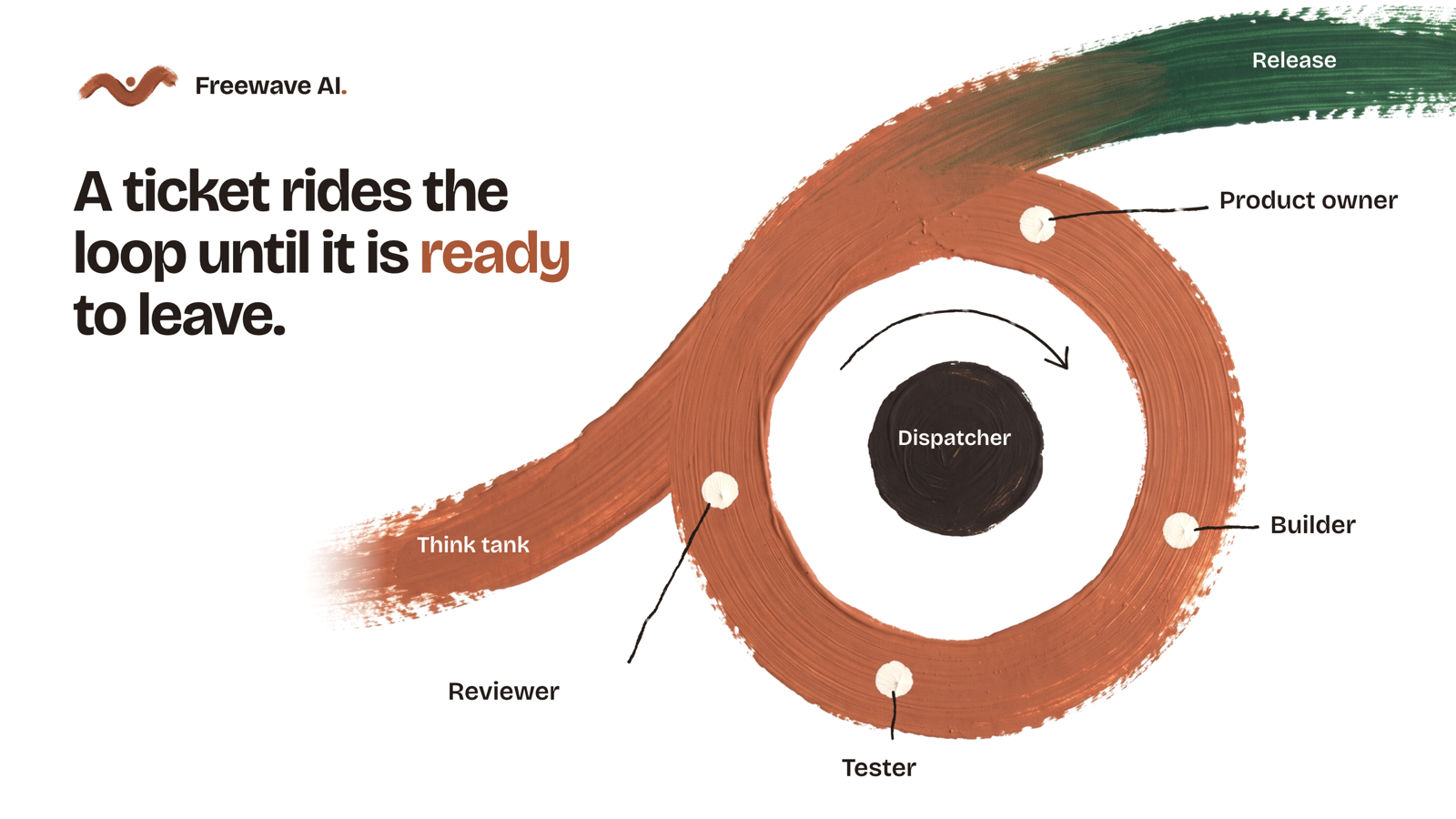
Picture a roundabout. There is one road in and one road out.
A piece of work, which we call a ticket, comes in one of two ways. Your ideas and requests come in through the think tank, which turns them into tickets. A bug needs no conversation: when one turns up, the loop writes the ticket itself. Either way, the ticket then travels round four roles. Each role does one job and hands the ticket to the next. In the middle sits a dispatcher, which does none of the work and only decides who goes next.
There is one way out: the last role approves the change. If any check fails on the way round, the ticket does not leave. It goes round again.
The four roles, and what each one needs
Product owner: writes the job down
Before anything is built, one agent turns the idea into a specification. A second agent, a critic, tries to pick holes in it.
A ticket is ready to build when it answers three questions:
- What will be different for the user? One or two plain sentences.
- How will we know it works? A numbered list of checks, each one something you can see or measure. "The save button is disabled until the form is valid" is a check. "The form feels better" is not.
- What happens when things go wrong? No signal, an empty list, a very long name, a tap twice in a row, a phone in dark mode, a user who says no to the permission. These edge cases are where most bugs live, and they are far cheaper to think of now than to find after release.
If the builder has to guess, it will guess, and you will find out later. The single most useful habit in the whole loop is to refuse to start a ticket that leaves something to guess.
Builder: builds one ticket, in its own space
The builder takes one ticket and builds it on its own copy of the code, a branch, so that a half-finished change can never break the app your users have. It builds what the ticket says and nothing else. If it finds the ticket is unclear, it does not improvise: the ticket goes back to the product owner.
Tester: runs the checks from the ticket
The tester is a different agent from the builder. That matters. An agent asked to check its own work tends to find that its work is fine.
The tester goes through the numbered checks from the ticket, on the app itself: on a phone or a simulator, not only by reading the code. Each check passes or fails. There is no "mostly".
Reviewer: the only way out
The reviewer reads the change itself. Does it do what the ticket asked? Does it do anything the ticket did not ask for? Would it be safe to live with in six months? The reviewer either approves it or sends it round again with the reason.
Only an approved change is released.
The dispatcher: the one that only decides
In the middle of the roundabout is the dispatcher. It never builds, tests or reviews. It looks at every ticket and decides who is next: this one is ready for the builder, that one failed a check and goes back, this one is approved and can leave.
Keeping this job separate is what lets the loop run without you. You are no longer the one who notices that something is finished and passes it on. Ours is called Nuri.
"Not ready? Round again"
This is the part that changes how the work feels.
When a check fails, nobody asks you what to do. The ticket goes back to the builder with the failed check attached, the builder fixes it, and the tester runs every check again. This repeats until the change works exactly as it was written down, or until the loop finds the ticket itself was wrong and sends it back to be rewritten.
You see the result, not the attempts.
How to start your own, this week
You do not need all of it on day one. In order:
- Write one ticket properly. Pick a small change. Write the three parts: what changes for the user, the numbered checks, the edge cases. Ask your AI tool to challenge it before it builds anything.
- Split building from checking. Start a fresh session, give it only the ticket and the finished change, and ask it to run the checks. Do not let the session that built it mark its own work.
- Make "failed" automatic. When a check fails, the failed check goes straight back to the builder. Remove yourself from that step first; it is the one that costs you the most time.
- Add the reviewer. A third session that reads the change against the ticket and can only say "approved" or "round again, because…".
- Add the dispatcher last. Once the roles work by hand, let one agent do the passing on.
After step three you will already notice the difference: you can leave, come back, and find the work further along than you left it.
Where it gets hard
We will be straight about this. The roles are easy to describe and take time to make dependable. Testing on real phones, store review, sign-in and payments, two tickets touching the same file, an agent that is confident and wrong: each of these needs its own answer before you can truly walk away.
That is the work we do. We run this loop for founders who would rather spend their time on users and sales than on the machinery. If you get stuck setting up your own, or would rather have it running next week, talk to Mandy on this site.
Guide resources
The one-page PDF of this guide is for weekly guide subscribers.
Stuck on your own loop?
Ask Mandy, our AI assistant. She can tell you how we would set it up for your app.