The product owner: turning an idea into a spec the loop can build
A builder can put up a kitchen extension without ever meeting you, as long as there are drawings. "Bright, with room for the kids" is a wish. A drawing with measurements is something a builder can build and an inspector can check.
Work for AI agents is the same. Our last guide, on the think tank, showed how an idea leaves your head as a desired outcome, a user story or two and some acceptance criteria. That is a good wish. It is not yet a drawing.
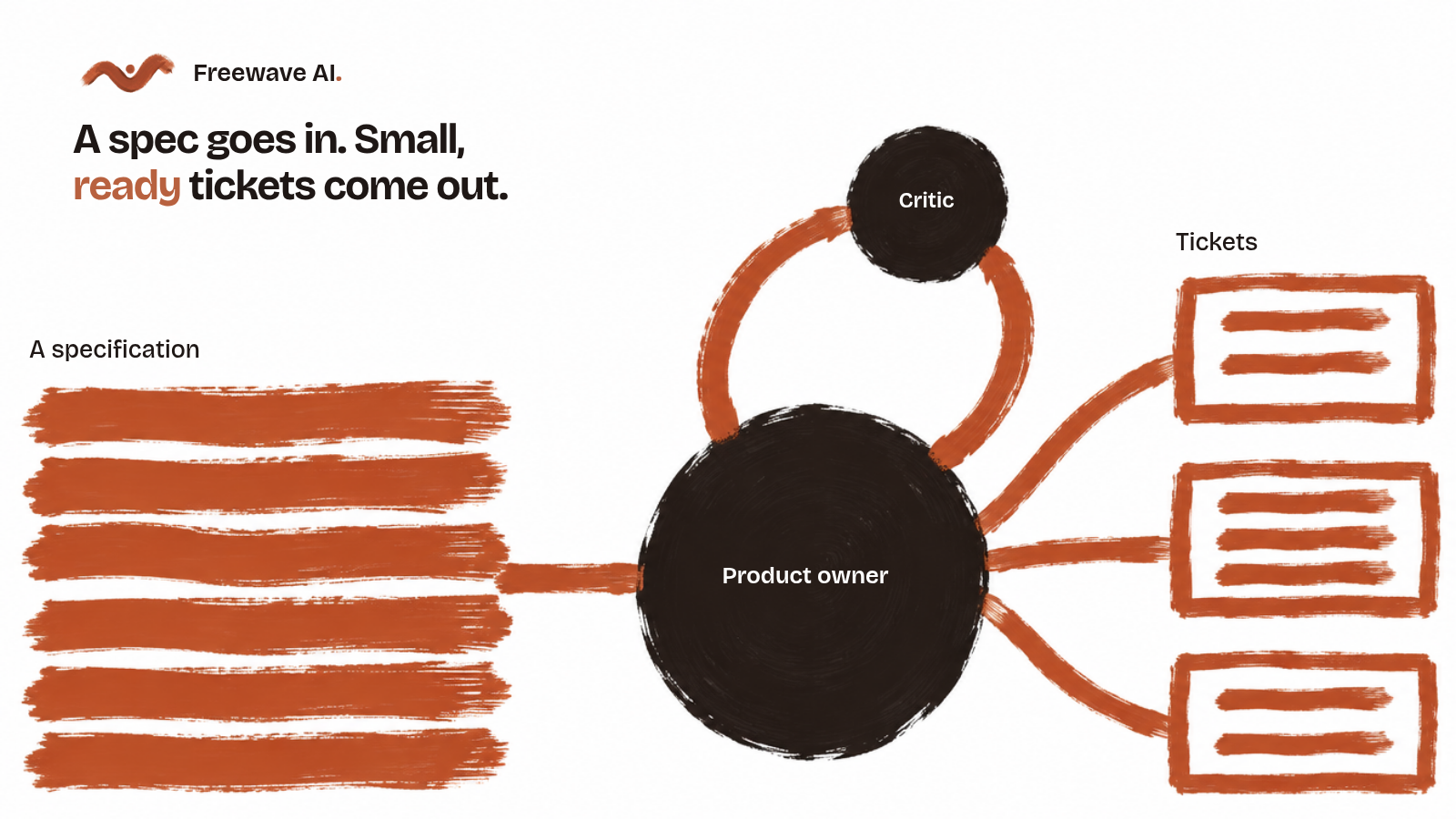
This guide is about the role that makes the drawing: the product owner. It sits between the think tank, where new work comes in, and the build. Nothing is built until it has been through here.
The mindset: ready means nobody has to ask
An idea feels ready when you can picture it. That is the wrong test, because the builder cannot see your picture. In the release loop, the builder builds what the ticket says and nothing else, and the tester checks the change against the numbered checks on the ticket. The ticket is all they have.
So ready gets a plain test. Could someone who has never spoken to you build this, and show that it works, without asking you a single question? If not, it is not ready, however clear it seems to you.
The product owner's job is to get every ticket to a yes. In our loop that role is an agent. Ours is called Pia.
What comes in
Two kinds of work reach the product owner. Ideas and requests arrive from the think tank, already talked through with you. Bugs arrive straight from the loop, which writes their tickets itself.
Both get the same treatment. A bug report says what broke. A ready ticket also says what fixed looks like, and how to check it.
What a ready spec holds
The release loop guide asked three questions of every ticket. A ready spec answers them, and adds three more lines:
- The outcome. One sentence in the product's own words: what the user will see.
- The checks. A numbered list. Each one passes or fails, and a tester who has never met you could run it.
- The edge cases. No signal, an empty list, a tap twice in a row, a second person doing the same thing at once. A change to a screen should also work at the largest text size and with a screen reader.
- What is out. At least one line on what this ticket does not do, so the builder does not helpfully do it anyway.
- The size. Small or medium where you can. Anything bigger is usually better split before it is built.
- How to test it. Numbered steps on the real app, on a phone when the change is on a phone.
The booking reminder, made ready
In the think tank guide, a founder walking back from a call sent one line: "Reminder the night before a booking?" It came back as an outcome, a user story and three criteria: a push notification the evening before, none for a booking made after that time, none for a cancelled booking. The founder changed 6pm to 7pm and passed it on.
The product owner reads that and looks for the gaps. 7pm by whose clock, the customer's phone or the venue's? What if someone has two bookings tomorrow? What if they have turned notifications off? What does tapping the notification open? What happens when a booking moves to another day?
Then it writes the ticket.
The ticket
Outcome: a customer with a booking tomorrow gets one push notification at 7pm the evening before, saying when and where.
Checks:
- A booking for tomorrow sends one notification at 7pm, venue time, with the booking's time and place.
- A booking made after 7pm the evening before sends nothing.
- A booking cancelled before 7pm sends nothing.
- A booking moved to another day sends its reminder for the new day only.
- Two bookings tomorrow send one notification that lists both.
- Tapping the notification opens that booking.
Edge cases: with notifications turned off, nothing is sent and nothing breaks. The notification reads correctly at the largest text size and with a screen reader.
Out of scope: email reminders; letting customers choose the time.
Size: small.
How to test it: on a test phone, make a booking for tomorrow and wait until 7pm venue time. One notification arrives. Tap it, and the booking opens. Repeat for checks 2 to 6.
A builder can build that without asking anything, and a tester can tell from it whether the build is right. That is what ready means.
Which questions come back to you
Writing the reminder ticket meant making choices: venue time, one notification for two bookings. The product owner made those itself and wrote each one down on the ticket, so you can see it and change it.
It decides what to ask you with one question: if its own best answer turns out to be wrong, what does it cost to undo? A wording, a test step or a time of day costs an edit, so it decides. Things that cannot be taken back come to you: a build already in customers' hands, money moving, a message to a real person, or a choice between two genuinely different products.
So you get few questions, and the ones you get are worth your time. The direction stays yours, as it did in the think tank.
Big ideas become small tickets
The think tank guide ended with payments: one idea that leaves as several tickets. The product owner splits each of those again, until every piece is small enough to build and test in one go.
Each piece gets its own spec, with its own checks. Pieces that change the same screen are best built one after the other, so they do not trip over each other.
Before anything is built, a second agent, a critic, tries to pick holes in the spec. If the builder still finds a gap later, the ticket goes back to the product owner, not to you.
Try it with the tool you already use
You do not need our loop to work this way. Any AI chat tool can help you write a ready spec.
- Start from the outcome: from your own think tank, or one sentence you write now about what the user will see.
- Write the checks as a numbered list. For each one, ask whether a stranger could tell a pass from a fail.
- For each check, picture a build that passes it and is still wrong. If you can, rewrite the check.
- Walk the edges: no signal, an empty list, two at once, a second person, notifications off, the largest text size, a screen reader.
- Write one line on what is out.
- Look at the size. If the checks run on and on, or the work mixes a design decision with the build, split it.
- Give the spec to a fresh AI session that has never seen your chat, and ask it to list every question it would need answered before building. Put the answers in the spec, not in a reply.
For a small change that takes ten minutes. For a big feature, step six turns one spec into several, and each one goes through the same steps.
Where it gets hard
The hard checks are the ones that look fine. "The reminder is sent" passes for a build that sends it at 3am, or sends it twice. Step three catches most of these, and it is the step people skip.
The other trap is the change that seems too small for a spec. Changing one word on a button is quick to build and quick to get wrong, on the one screen where the new word does not fit. A small spec is a few lines, and a few lines are still better than a guess.
Where we come in
We run this loop for founders. We connect to your app and backend and keep design, specs, building, testing and release moving, day and night. You decide the direction. If you want to talk through how a product owner would work for your app, or would rather have the whole loop running behind it, talk to Mandy on this site.
Get the weekly guide
Sign up for our weekly guide and we will send you a new one every week, each about one part of the loop.
Stuck on your own loop?
Ask Mandy, our AI assistant. She can tell you how we would set it up for your app.